In Teil 1 habe ich die LED-Matrix gebaut, in Teil 2 das Bedienfeld mit Drehknöpfen. Jetzt kommt das letzte Stück: Gelb – das Gerät mit dem Touchscreen-Display, das alles zusammenhält.
Was macht Gelb eigentlich?
Gelb ist das Vermittler-Gerät. Es:
- Zeigt auf einem Display an, welches Programm gerade läuft
- Nimmt Befehle von Blau (dem Bedienfeld) entgegen
- Schickt Befehle an Bunt (die LED-Matrix) weiter
- Ist mit Home Assistant verbunden, sodass man auch vom Handy aus steuern kann
- Hat einen eigenen Touchscreen zum direkten Bedienen
Die Hardware
| Teil | Wozu? | Ungefährer Preis |
|---|---|---|
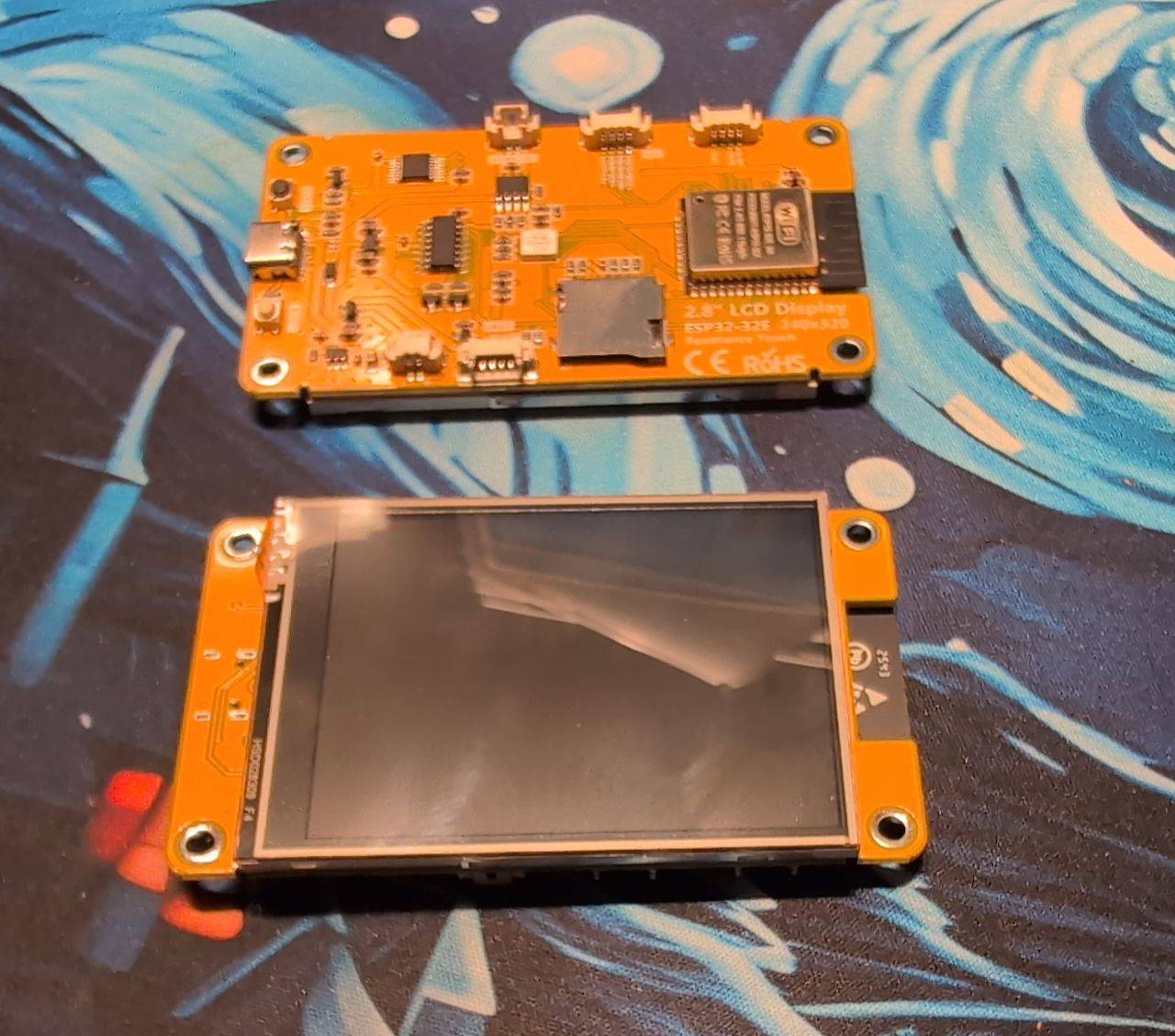
| ESP32 2.8” Touchscreen-Display (integriert) | ESP32-WROOM-32 + ILI9341 Display + XPT2046 Touch auf einer Platine | ~20 € |
| Gehäuse, Kabel | ~5 € |
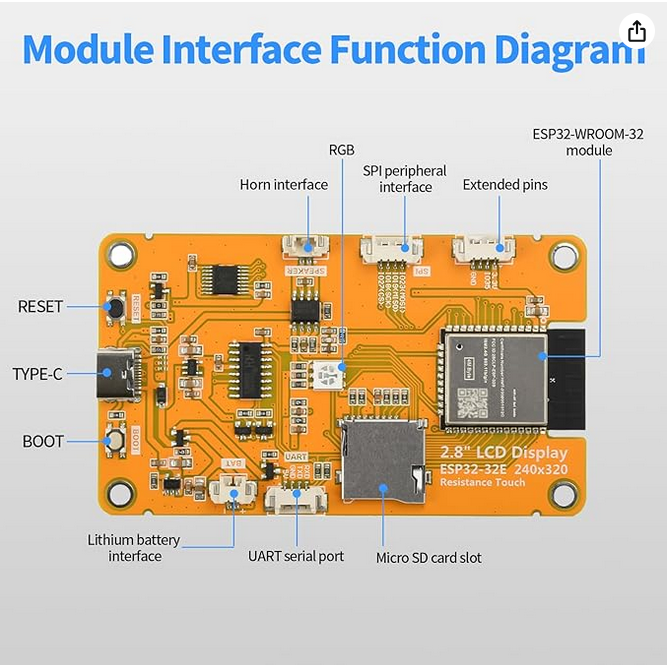
Das Besondere an diesem Board: ESP32, Display und Touchscreen sind bereits auf einer Platine zusammengebaut – kein Verdrahten, kein Basteln. Einfach anschließen und loslegen. Der ESP32-WROOM-32 (240 MHz Dual-Core) ist direkt aufgelötet, Display (ILI9341, 240×320 Pixel) und Touchscreen (XPT2046, Resistive Touch) teilen sich einen gemeinsamen SPI-Bus auf der Platine.
SPI – das schnelle Bruderkind von I2C
Im Blau-Post habe ich I2C erklärt – einen Bus der mit 2 Drähten viele Geräte verbindet, aber dafür etwas langsamer ist. Für ein Display braucht man viel höhere Geschwindigkeit, weil man schnell viele Bildpunkte übertragen muss. Dafür gibt es SPI (Serial Peripheral Interface).
SPI ist wie eine eigene Datenautobahn für jedes Gerät:
- Mehr Drähte (4 statt 2)
- Dafür viel schneller
- Jedes Gerät bekommt einen eigenen “Chip Select”-Pin
Bei Gelb teilen sich Display und Touchscreen einen gemeinsamen SPI-Bus – das funktioniert, weil sie über separate “Chip Select”-Pins voneinander getrennt werden. Immer wenn der ESP32 mit dem Display spricht, wird nur dessen CS-Pin aktiviert, beim Touchscreen entsprechend dessen eigener CS-Pin. Das integrierte Board macht diese Verkabelung intern, man sieht davon nichts.
LVGL – der Grafik-Baukasten
Das Display zeigt nicht einfach Text an – es hat ein richtiges grafisches Menü mit Tabs, Buttons und farbigem Text. Dafür gibt es eine Bibliothek namens LVGL (Light and Versatile Graphics Library).
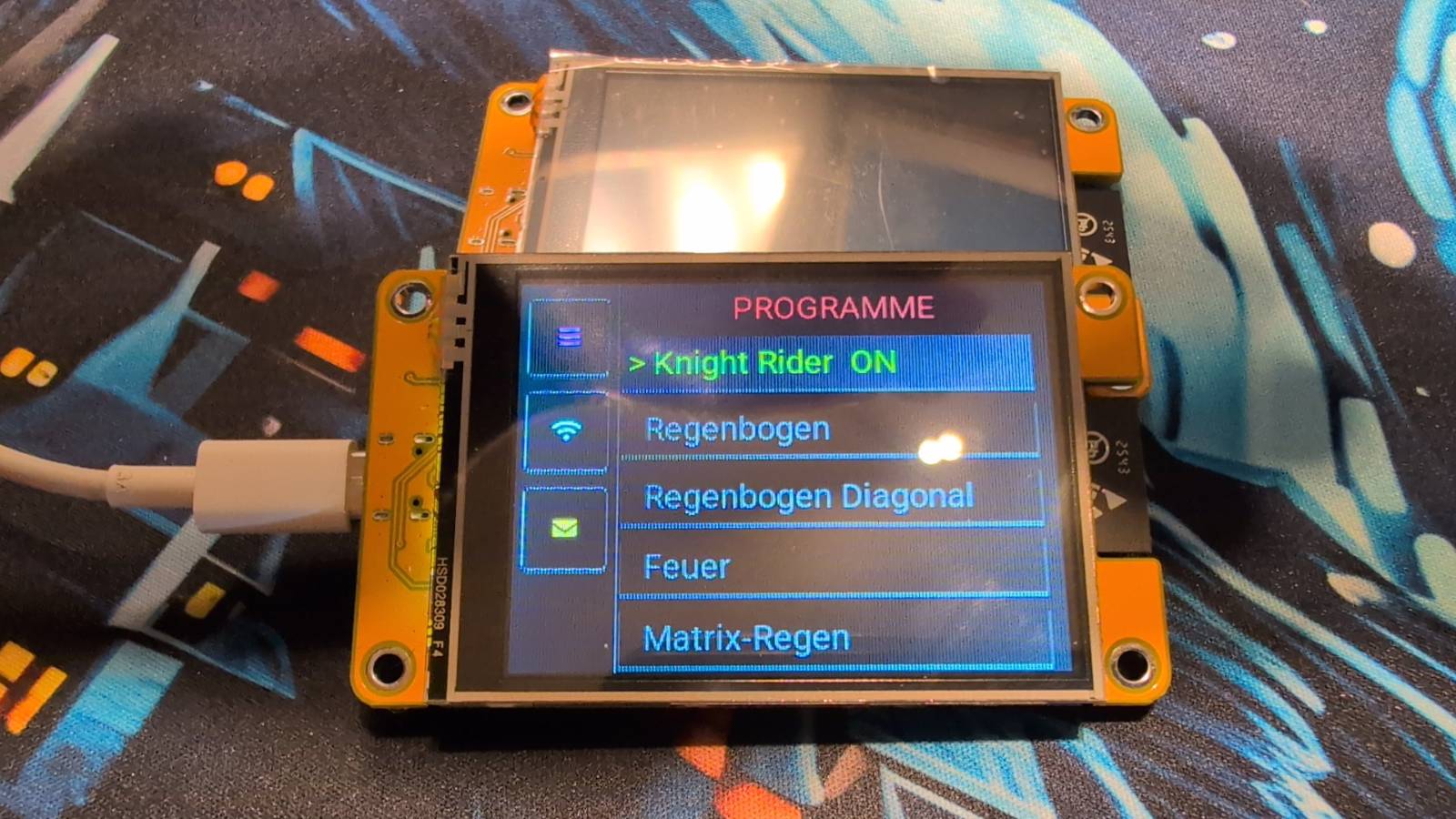
LVGL ist wie ein Baukasten für Bildschirm-Oberflächen. Man beschreibt, was man sehen will:
- “Hier soll ein Button sein, 50 Pixel breit, orangefarbener Rahmen”
- “Hier soll eine scrollbare Liste sein”
- “Wenn man diesen Button drückt, soll das hier passieren”
Und LVGL kümmert sich darum, das auf den Bildschirm zu zeichnen!
Die drei Seiten des Displays
Das Display ist in drei Seiten (Tabs) aufgeteilt:
Seite 1: Programme
Hier sieht man alle verfügbaren Lichtprogramme. Das aktive Programm leuchtet grün. Mit dem Drehknopf von Blau kann man durch die Liste scrollen, oder direkt auf einen Eintrag tippen.
Die Liste kommt übrigens direkt von Bunt! Wenn Bunt startet, schickt er per ESP-NOW eine Liste aller seiner Programme. Gelb empfängt diese Liste und baut das Menü daraus auf. Wenn man später ein neues Programm zu Bunt hinzufügt, erscheint es automatisch in Gelbs Menü.
Seite 2: WiFi-Status
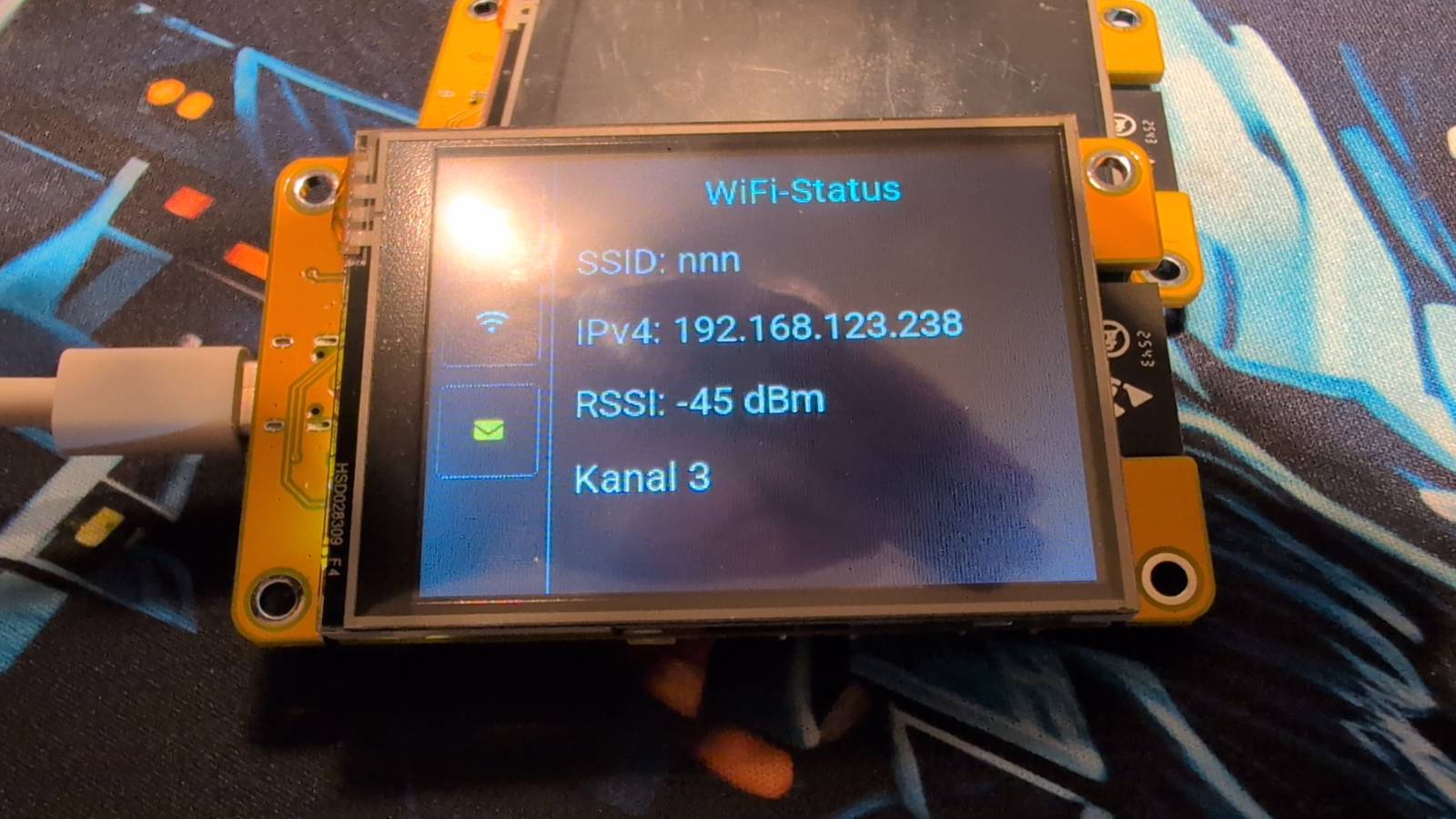
Eine einfache Statusseite: welches WLAN ist verbunden, welche IP-Adresse hat das Gerät, wie stark ist das Signal. Praktisch wenn man wissen will ob alles ordentlich verbunden ist.
Seite 3: Nachrichten und Farben
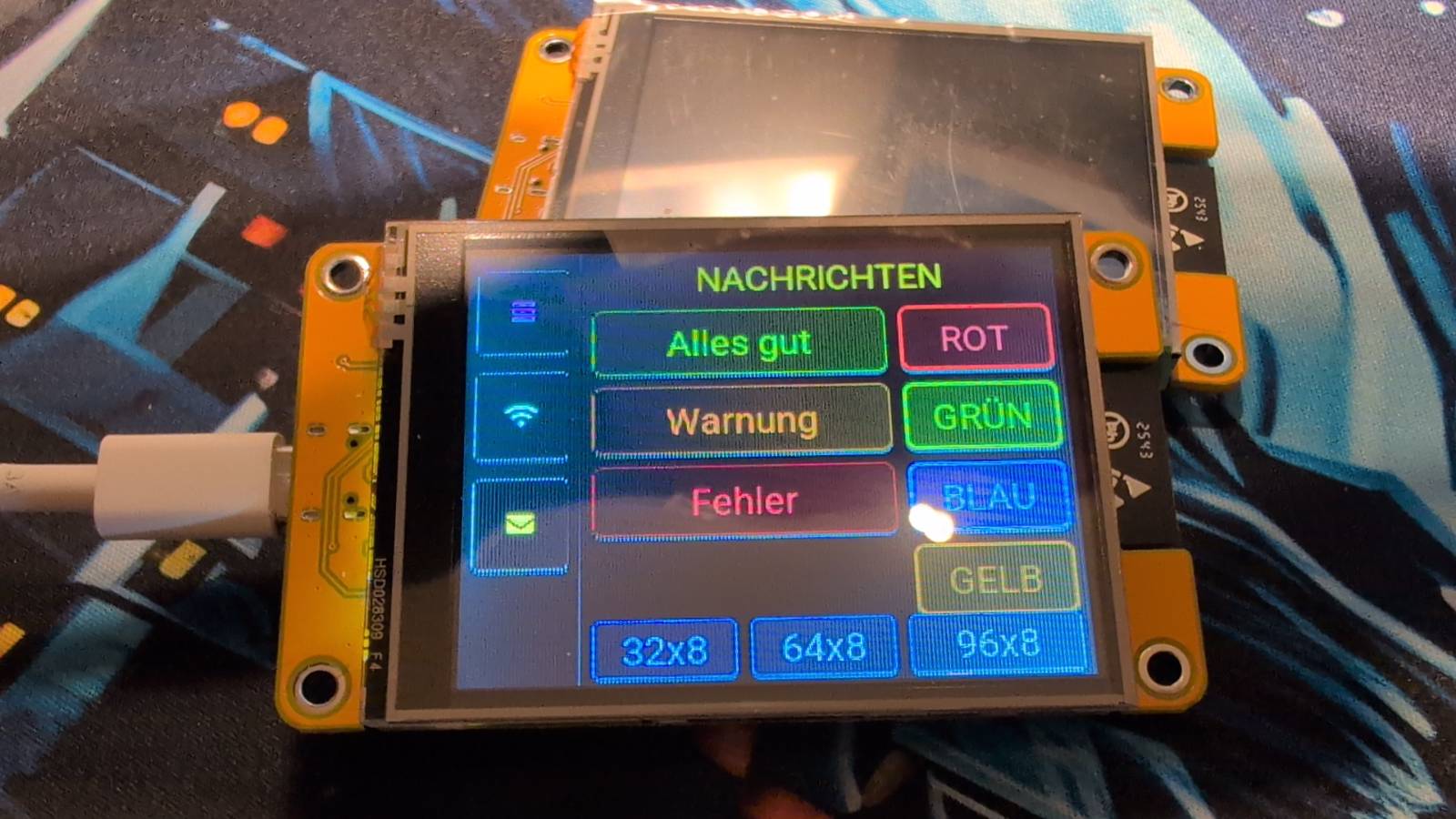
Hier kann man vordefinierte Nachrichten auf die LED-Matrix schicken:
- Alles gut (grüner Text)
- Warnung (oranger Text)
- Fehler (roter Text)
Außerdem gibt es Farb-Buttons für die Basisfarbe (Rot, Grün, Blau, Gelb) und die Möglichkeit die Matrix-Größe umzustellen (32×8, 64×8 oder 96×8 LEDs).
Die Verbindung zu Home Assistant
Das ist mein persönliches Lieblings-Feature! Home Assistant ist eine Software, die auf einem kleinen Computer zuhause läuft und alle Smart-Home-Geräte zusammenbringt.
Über Home Assistant kann ich mein Licht:
- Von überall steuern – auch wenn ich nicht zuhause bin
- Automatisieren – zum Beispiel: “jeden Morgen um 7 Uhr Knight Rider starten”
- Mit anderen Geräten verbinden – zum Beispiel: wenn der Türsensor meldet dass die Haustür offen ist, scrollt “Tür offen!” über die Matrix
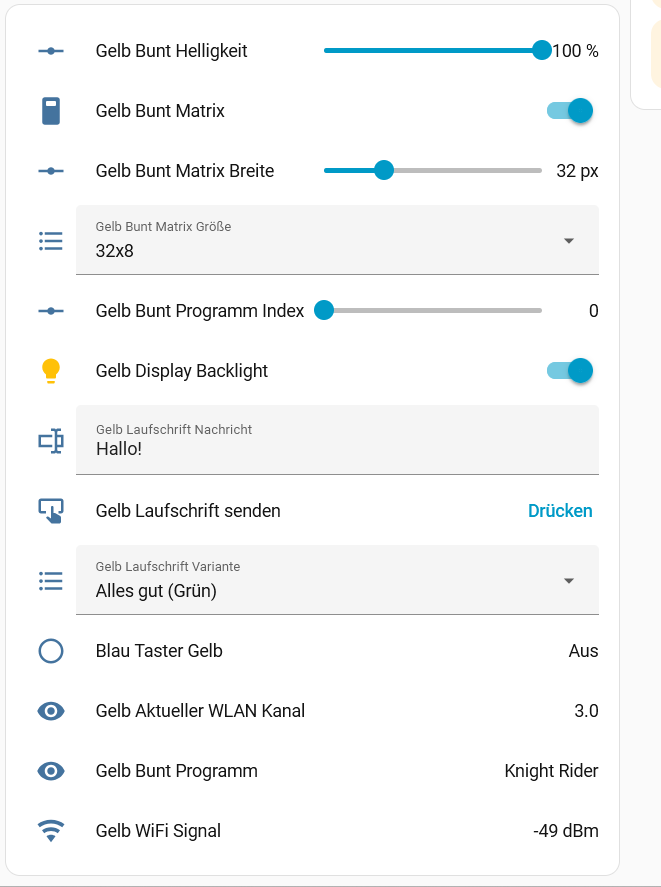
Gelb stellt in Home Assistant folgende Bedienelemente bereit:
| Entity | Funktion |
|---|---|
| Bunt Matrix (Schalter) | Ein/Aus |
| Bunt Helligkeit (Schieberegler) | Helligkeit 0-100% |
| Bunt Programm Index (Schieberegler) | Programm wählen |
| Bunt Programm (Text) | Zeigt aktuellen Programmnamen |
| Laufschrift Nachricht (Eingabe) | Text der angezeigt werden soll |
| Laufschrift Variante (Auswahl) | Farbe der Laufschrift |
| Laufschrift senden (Button) | Nachricht abspielen |
Ein Beispiel für eine Automation
Stell dir vor, die Waschmaschine hat einen Sensor der meldet wenn sie fertig ist. In Home Assistant kann man dann sagen:
Wenn: Waschmaschine meldet "fertig"
Dann: Sende an Gelb:
  Nachricht: "Waschmaschine fertig!"
  Farbe: Grün (Alles gut)
  Dauer: 30 Sekunden
Diese Nachricht scrollt dann 30 Sekunden lang in grünem Text über die Matrix, danach läuft das vorherige Programm wieder weiter. Alles automatisch!
Wie das alles zusammenspielt
Jetzt wo wir alle drei Teile kennen, hier das große Bild:
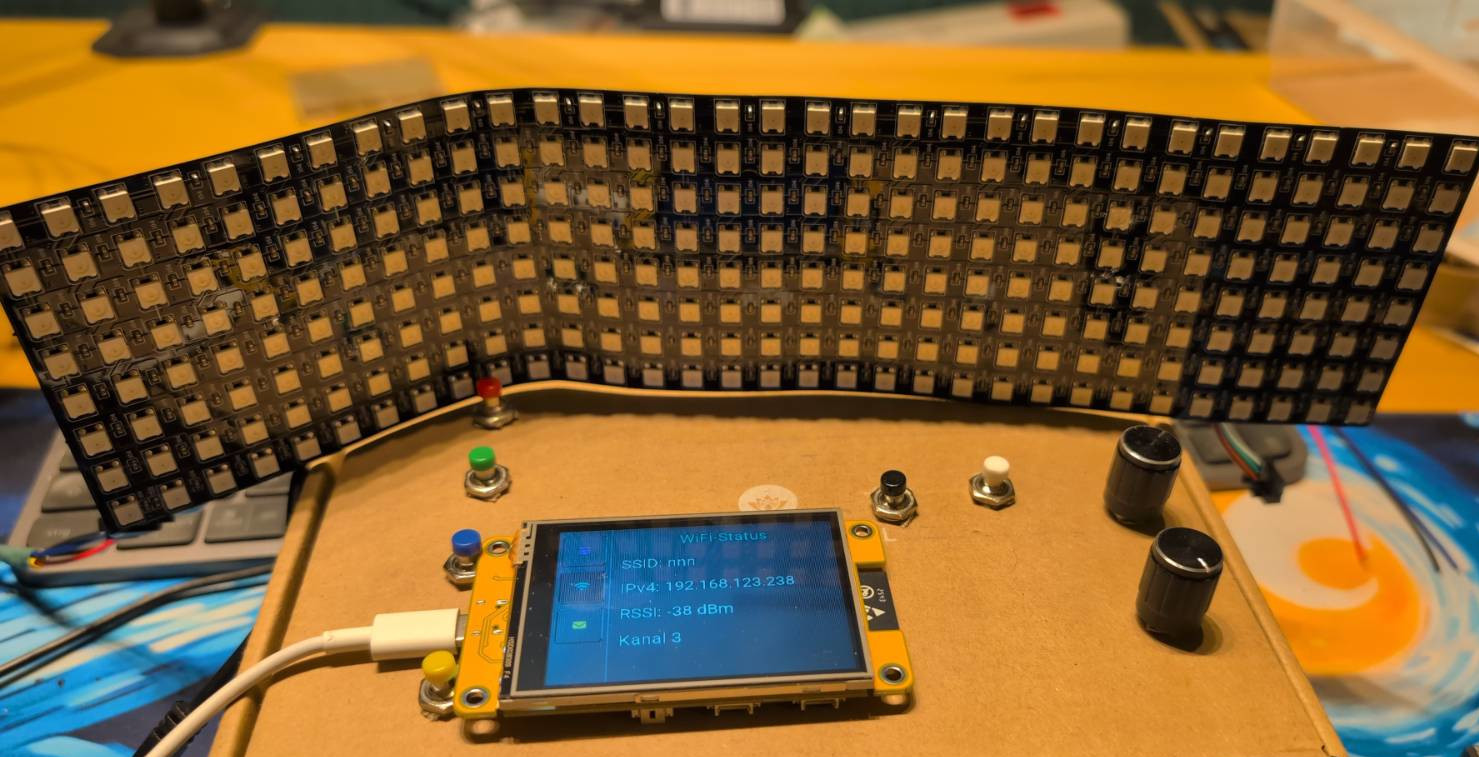
Blau (Bedienfeld)
  → sendet Befehle per ESP-NOW
  → an Gelb (Display)

Gelb (Display)
  → leitet Befehle weiter an Bunt
  → zeigt den Status an
  → ist mit Home Assistant verbunden

Bunt (LED-Matrix)
  → führt Lichtprogramme aus
  → schickt Programmliste an Gelb und Orange

Home Assistant
  → steuert Gelb von überall
  → kann Automationen ausführen

Orange (zweites Display, optional)
  → identisch zu Gelb
  → kann in einem anderen Zimmer stehen
Der clevere Teil: Bunt kann von mehreren Gelb/Orange-Geräten gleichzeitig gesteuert werden. Ich könnte eines im Wohnzimmer und eines im Schlafzimmer aufstellen – beide steuern dieselbe Matrix!
Die Firmware
esphome:
name: gelb
friendly_name: Gelb
on_boot:
- priority: -10
then:
- light.turn_on: gelb_backlight
- priority: -100
then:
- delay: 5s
- espnow.send:
address: !secret buntmac
data: !lambda |-
std::string s = "r:list";
return std::vector<uint8_t>(s.begin(), s.end());
esp32:
board: esp32dev
framework:
type: esp-idf
api:
encryption:
key: !secret gelbkey
on_client_connected:
then:
- espnow.send:
address: !secret buntmac
data: !lambda |-
std::string s = "r:list";
return std::vector<uint8_t>(s.begin(), s.end());
services:
- service: laufschrift_senden
variables:
nachricht: string
variante: int # 0=Blau(Info), 1=Grün(Alles gut), 2=Gelb(Warnung), 3=Rot(Fehler)
dauer: int # Sekunden bis Rückkehr, 0 = kein Rückkehr
then:
- lambda: |-
// Laufendes Programm merken
id(vorheriges_programm) = id(active_program);
// Laufschrift starten
static std::string s;
s = "m:" + std::to_string(variante) + ":" + nachricht;
id(active_program) = 10;
- espnow.send:
address: !secret buntmac
data: !lambda |-
static std::string s;
s = "m:" + std::to_string(variante) + ":" + nachricht;
return std::vector<uint8_t>(s.begin(), s.end());
- if:
condition:
lambda: 'return dauer > 0;'
then:
- delay: !lambda 'return dauer * 1000;'
- lambda: |-
// Zurück zum vorherigen Programm
int prog = id(vorheriges_programm);
if (prog >= 0) {
id(active_program) = prog;
id(menu_index) = prog;
id(update_prog_styles).execute();
id(ha_prog_number).publish_state(prog);
if ((int)id(prog_names).size() > prog)
id(ha_prog_name).publish_state(id(prog_names)[prog]);
} else {
// Kein vorheriges Programm → ausschalten
id(matrix_on) = false;
id(ha_matrix_switch).publish_state(false);
}
- espnow.send:
address: !secret buntmac
data: !lambda |-
static std::string s;
int prog = id(vorheriges_programm);
if (prog >= 0)
s = "p:" + std::to_string(prog);
else
s = "p:-1";
return std::vector<uint8_t>(s.begin(), s.end());
ota:
- platform: esphome
password: !secret gelbpassword
logger:
level: DEBUG
font:
- file: "gfonts://Roboto"
id: font_roboto_20
size: 20
bpp: 4
glyphs: "ABCDEFGHIJKLMNOPQRSTUVWXYZabcdefghijklmnopqrstuvwxyz0123456789.,:;!?-+ ÄÖÜäöüß>"
globals:
- id: current_page
type: int
initial_value: '1'
- id: active_program
type: int
initial_value: '-1'
- id: menu_index
type: int
initial_value: '0'
- id: num_entries
type: int
initial_value: '0'
- id: prog_names
type: std::vector<std::string>
- id: matrix_on
type: bool
initial_value: 'false'
- id: current_brightness
type: float
initial_value: '1.0'
- id: receiving_list
type: bool
initial_value: 'false'
- id: display_flipped
type: bool
initial_value: 'false'
- id: base_color
type: int
initial_value: '0'
- id: vorheriges_programm
type: int
initial_value: '-1' # 0=Rot, 1=Grün, 2=Blau, 3=Gelb
wifi:
networks:
- ssid: !secret wifi10_ssid
password: !secret wifi10_password
priority: 100
- ssid: !secret wifi2_ssid
password: !secret wifi2_password
priority: 50
- ssid: !secret wifi3_ssid
password: !secret wifi2_password
priority: 50
- ssid: !secret wifi4_ssid
password: !secret wifi4_password
priority: 10
fast_connect: true
on_connect:
then:
- lvgl.widget.hide: lbl_wifi_warn
on_disconnect:
then:
- lvgl.widget.show: lbl_wifi_warn
espnow:
auto_add_peer: true
peers:
- !secret buntmac
on_receive:
then:
- lambda: |-
std::string data_str((const char*)data, size);
if (data_str.length() < 2) return;
std::string prefix = data_str.substr(0, 2);
std::string val_str = data_str.substr(2);
if (prefix == "v:") {
int delta = atoi(val_str.c_str());
int max_e = id(num_entries);
if (max_e > 0) {
id(menu_index) = ((id(menu_index) + delta) % max_e + max_e) % max_e;
id(active_program) = id(menu_index);
id(matrix_on) = true;
id(update_prog_styles).execute();
id(send_program_select).execute();
id(ha_prog_number).publish_state(id(active_program));
if ((int)id(prog_names).size() > id(active_program))
id(ha_prog_name).publish_state(id(prog_names)[id(active_program)]);
id(ha_matrix_switch).publish_state(true);
}
}
// ── Encoder-Taster: Reserve ────────────────────────────────────
else if (prefix == "c:") {
// Reserve für zukünftige Funktion
}
else if (prefix == "b:") {
int next = (id(current_page) % 3) + 1;
id(current_page) = next;
lv_obj_set_style_bg_color(id(btn_tab1), lv_color_hex(next==1?0x282828:0x000000), LV_PART_MAIN);
lv_obj_set_style_bg_color(id(btn_tab2), lv_color_hex(next==2?0x282828:0x000000), LV_PART_MAIN);
lv_obj_set_style_bg_color(id(btn_tab3), lv_color_hex(next==3?0x282828:0x000000), LV_PART_MAIN);
if (next==1) { lv_obj_clear_flag(id(panel_programme),LV_OBJ_FLAG_HIDDEN); } else { lv_obj_add_flag(id(panel_programme),LV_OBJ_FLAG_HIDDEN); }
if (next==2) { lv_obj_clear_flag(id(panel_wifi),LV_OBJ_FLAG_HIDDEN); } else { lv_obj_add_flag(id(panel_wifi),LV_OBJ_FLAG_HIDDEN); }
if (next==3) { lv_obj_clear_flag(id(panel_nachrichten),LV_OBJ_FLAG_HIDDEN);}else { lv_obj_add_flag(id(panel_nachrichten),LV_OBJ_FLAG_HIDDEN); }
}
// ── Helligkeit von Blau empfangen und an Bunt weiterleiten ────
else if (prefix == "h:") {
int pct = atoi(val_str.c_str());
id(current_brightness) = pct / 100.0f;
id(ha_brightness).publish_state((float)pct);
id(send_brightness).execute();
}
// ── Basisfarbe weiterleiten + UI aktualisieren ───────────────
else if (prefix == "k:") {
int ci = atoi(val_str.c_str());
id(base_color) = ci;
id(send_base_color).execute(ci);
// PROGRAMME-Titel einfärben
lv_color_t col;
if (ci == 0) col = lv_color_hex(0xFF3030); // Rot
else if (ci == 1) col = lv_color_hex(0x00FF00); // Grün
else if (ci == 2) col = lv_color_hex(0x6464FF); // Blau
else col = lv_color_hex(0xFF8C00); // Gelb/Orange
lv_obj_set_style_text_color(id(lbl_programme_title), col, LV_PART_MAIN);
// Farbindikator auf Seite 3 aktualisieren
const char* names[] = {"● ROT", "● GRÜN", "● BLAU", "● GELB"};
lv_label_set_text(id(lbl_farb_indikator), names[ci]);
lv_obj_set_style_text_color(id(lbl_farb_indikator), col, LV_PART_MAIN);
// Falls Laufschrift läuft → Variante anpassen
// k:0(Rot)→s:3, k:1(Grün)→s:1, k:2(Blau)→s:0, k:3(Gelb)→s:2
if (id(active_program) == 10) {
const int mapping[] = {3, 1, 0, 2};
id(send_scroll_variant).execute(mapping[ci]);
}
}
// ── Matrix ausschalten ────────────────────────────────────────
else if (prefix == "x:") {
id(matrix_on) = false;
id(send_program_off).execute();
id(ha_matrix_switch).publish_state(false);
}
// ── Display drehen ────────────────────────────────────────────
else if (prefix == "f:") {
ESP_LOGI("gelb", "f:flip empfangen, starte flip_display");
id(flip_display).execute();
}
// ── Programmliste von Bunt ────────────────────────────────────
else if (prefix == "n:") {
if (val_str == "END") {
id(receiving_list) = false;
id(rebuild_program_list).execute();
} else {
if (!id(receiving_list)) {
id(prog_names).clear();
id(receiving_list) = true;
}
size_t colon = val_str.find(':');
if (colon != std::string::npos) {
int idx = atoi(val_str.substr(0, colon).c_str());
std::string name = val_str.substr(colon + 1);
if ((int)id(prog_names).size() <= idx)
id(prog_names).resize(idx + 1);
id(prog_names)[idx] = name;
}
}
}
output:
- platform: ledc
pin: GPIO21
id: backlight_pwm
light:
- platform: binary
output: backlight_pwm
name: "Display Backlight"
id: gelb_backlight
restore_mode: ALWAYS_ON
spi:
- id: bus_tft
clk_pin: GPIO14
mosi_pin: GPIO13
miso_pin: GPIO12
- id: bus_touch
clk_pin: GPIO25
mosi_pin: GPIO32
miso_pin: { number: GPIO39, mode: { input: true, pullup: false } }
display:
- platform: ili9xxx
id: my_display
model: ILI9341
spi_id: bus_tft
cs_pin: GPIO15
dc_pin: GPIO2
rotation: 270
invert_colors: false
update_interval: never
touchscreen:
- platform: xpt2046
id: touch_display
spi_id: bus_touch
cs_pin: GPIO33
interrupt_pin: { number: GPIO36, mode: { input: true, pullup: false } }
calibration: { x_min: 208, x_max: 3823, y_min: 282, y_max: 3835 }
transform:
swap_xy: true
mirror_x: true
mirror_y: true
text_sensor:
- platform: template
name: "Bunt Programm"
id: ha_prog_name
- platform: wifi_info
ssid:
id: connected_ssid
on_value:
then:
- lvgl.label.update:
id: lbl_ssid
text: !lambda |-
static std::string s; s = "SSID: " + x; return s.c_str();
ip_address:
id: connected_ip
on_value:
then:
- lvgl.label.update:
id: lbl_ip4
text: !lambda |-
static std::string s; s = "IPv4: " + x; return s.c_str();
bssid:
id: connected_bssid
number:
- platform: template
name: "Bunt Programm Index"
id: ha_prog_number
min_value: 0
max_value: 11
step: 1
initial_value: 0
optimistic: true
on_value:
then:
- lambda: |-
int idx = (int)x;
if (idx < 0 || idx >= id(num_entries)) return;
id(active_program) = idx; id(menu_index) = idx; id(matrix_on) = true;
id(update_prog_styles).execute(); id(send_program_select).execute();
if ((int)id(prog_names).size() > idx) id(ha_prog_name).publish_state(id(prog_names)[idx]);
id(ha_matrix_switch).publish_state(true);
- platform: template
name: "Bunt Helligkeit"
id: ha_brightness
min_value: 0
max_value: 100
step: 5
initial_value: 100
optimistic: true
unit_of_measurement: "%"
on_value:
then:
- lambda: |-
id(current_brightness) = x / 100.0f;
id(send_brightness).execute();
- platform: template
name: "Bunt Matrix Breite"
id: ha_matrix_breite
min_value: 8
max_value: 96
step: 8
initial_value: 32
optimistic: true
unit_of_measurement: "px"
on_value:
then:
- espnow.send:
address: !secret buntmac
data: !lambda |-
static std::string s;
s = "w:" + std::to_string((int)x);
return std::vector<uint8_t>(s.begin(), s.end());
switch:
- platform: template
name: "Bunt Matrix"
id: ha_matrix_switch
optimistic: true
on_turn_on:
then:
- lambda: |-
id(matrix_on) = true;
if (id(active_program) >= 0) id(send_program_select).execute();
on_turn_off:
then:
- lambda: |-
id(matrix_on) = false;
id(send_program_off).execute();
text:
- platform: template
name: "Laufschrift Nachricht"
id: ha_scroll_text
optimistic: true
mode: text
initial_value: "Hallo!"
select:
- platform: template
name: "Laufschrift Variante"
id: ha_scroll_variant
optimistic: true
options:
- "Info (Blau)"
- "Alles gut (Grün)"
- "Warnung (Gelb)"
- "Fehler (Rot)"
initial_option: "Alles gut (Grün)"
- platform: template
name: "Bunt Matrix Größe"
id: ha_matrix_groesse
optimistic: true
options:
- "32x8"
- "64x8"
- "96x8"
- "Manuell"
initial_option: "32x8"
on_value:
then:
- lambda: |-
if (x == "32x8") {
id(ha_matrix_breite).publish_state(32);
} else if (x == "64x8") {
id(ha_matrix_breite).publish_state(64);
} else if (x == "96x8") {
id(ha_matrix_breite).publish_state(96);
}
// Manuell → nichts tun, Benutzer stellt Breite selbst ein
button:
- platform: template
name: "Laufschrift senden"
on_press:
then:
- lambda: id(send_scroll_message).execute();
sensor:
- platform: wifi_signal
name: "WiFi Signal"
id: wifi_rssi
update_interval: 10s
on_value:
then:
- lvgl.label.update:
id: lbl_rssi
text: !lambda |-
static std::string s;
s = "RSSI: " + std::to_string((int)x) + " dBm";
return s.c_str();
- platform: template
name: "Aktueller WLAN Kanal"
id: wlan_kanal
lambda: |-
return wifi::global_wifi_component->get_wifi_channel();
update_interval: 10s
on_value:
then:
- lvgl.label.update:
id: lbl_channel
text: !lambda |-
static std::string s;
s = "Kanal " + std::to_string((int)x);
return s.c_str();
# ---------------------------------------------------------------------------
# INTERVAL – Programmliste anfordern falls noch nicht geladen
# ---------------------------------------------------------------------------
interval:
- interval: 30s
then:
- lambda: |-
if (id(num_entries) == 0) {
id(request_program_list).execute();
}
script:
- id: request_program_list
then:
- espnow.send:
address: !secret buntmac
data: !lambda |-
std::string s = "r:list";
return std::vector<uint8_t>(s.begin(), s.end());
- id: flip_display
then:
- lambda: |-
id(display_flipped) = !id(display_flipped);
ESP_LOGI("gelb", "flip_display: display_flipped=%d", id(display_flipped));
lv_disp_t* disp = lv_disp_get_default();
if (id(display_flipped)) {
lv_disp_set_rotation(disp, LV_DISP_ROT_180);
} else {
lv_disp_set_rotation(disp, LV_DISP_ROT_NONE);
}
// Ganzen Bildschirm neu zeichnen erzwingen
lv_obj_invalidate(lv_scr_act());
lv_refr_now(disp);
// Touchscreen-Transformation anpassen
auto* ts = id(touch_display);
if (id(display_flipped)) {
ts->set_mirror_x(true);
ts->set_mirror_y(true);
} else {
ts->set_mirror_x(false);
ts->set_mirror_y(false);
}
- id: send_program_select
then:
- espnow.send:
address: !secret buntmac
data: !lambda |-
static std::string s;
s = "p:" + std::to_string(id(active_program));
return std::vector<uint8_t>(s.begin(), s.end());
- id: send_program_off
then:
- espnow.send:
address: !secret buntmac
data: !lambda |-
std::string s = "p:-1";
return std::vector<uint8_t>(s.begin(), s.end());
- id: send_brightness
then:
- espnow.send:
address: !secret buntmac
data: !lambda |-
static std::string s;
int pct = (int)(id(current_brightness) * 100.0f);
s = "h:" + std::to_string(pct);
return std::vector<uint8_t>(s.begin(), s.end());
- id: send_scroll_variant
parameters:
variant: int
then:
- espnow.send:
address: !secret buntmac
data: !lambda |-
static std::string s;
s = "s:" + std::to_string(variant);
return std::vector<uint8_t>(s.begin(), s.end());
- id: send_base_color
parameters:
color_idx: int
then:
- espnow.send:
address: !secret buntmac
data: !lambda |-
static std::string s;
s = "k:" + std::to_string(color_idx);
return std::vector<uint8_t>(s.begin(), s.end());
- id: send_scroll_message
then:
- espnow.send:
address: !secret buntmac
data: !lambda |-
static std::string s;
int variant = 1;
std::string sel = id(ha_scroll_variant).state;
if (sel == "Info (Blau)") variant = 0;
else if (sel == "Alles gut (Grün)") variant = 1;
else if (sel == "Warnung (Gelb)") variant = 2;
else if (sel == "Fehler (Rot)") variant = 3;
s = "m:" + std::to_string(variant) + ":" + id(ha_scroll_text).state;
return std::vector<uint8_t>(s.begin(), s.end());
- id: send_preset_message
parameters:
variant: int
msg: std::string
then:
- espnow.send:
address: !secret buntmac
data: !lambda |-
static std::string s;
s = "m:" + std::to_string(variant) + ":" + msg;
return std::vector<uint8_t>(s.begin(), s.end());
- id: rebuild_program_list
then:
- lambda: |-
int count = (int)id(prog_names).size();
for (int i = 0; i < 12; i++) {
lv_obj_t* btn = lv_obj_get_child(id(programme_list), i);
if (!btn) continue;
if (i < count) {
lv_obj_clear_flag(btn, LV_OBJ_FLAG_HIDDEN);
lv_obj_t* lbl = lv_obj_get_child(btn, 0);
if (lbl) { std::string name = " " + id(prog_names)[i]; lv_label_set_text(lbl, name.c_str()); }
} else {
lv_obj_add_flag(btn, LV_OBJ_FLAG_HIDDEN);
}
}
id(num_entries) = count; id(menu_index) = 0; id(active_program) = -1;
id(update_prog_styles).execute();
id(ha_prog_number).publish_state(0);
if (!id(prog_names).empty()) id(ha_prog_name).publish_state(id(prog_names)[0]);
- id: update_prog_styles
then:
- lambda: |-
lv_obj_t* container = id(programme_list);
const int num = id(num_entries), active = id(active_program), hover = id(menu_index);
for (int i = 0; i < num; i++) {
lv_obj_t* btn = lv_obj_get_child(container, i);
if (!btn) continue;
lv_obj_t* lbl = lv_obj_get_child(btn, 0);
if (!lbl) continue;
const bool is_active = (i == active), is_hover = (i == hover);
if (is_hover) { lv_obj_set_style_bg_color(btn, lv_color_hex(0x28283C), LV_PART_MAIN); lv_obj_set_style_bg_opa(btn, LV_OPA_COVER, LV_PART_MAIN); }
else { lv_obj_set_style_bg_opa(btn, LV_OPA_TRANSP, LV_PART_MAIN); }
lv_color_t col; char buf[32];
if (is_active && is_hover) { col=lv_color_hex(0x00FF00); snprintf(buf,sizeof(buf),"> %s ON",id(prog_names)[i].c_str()); }
else if (is_active) { col=lv_color_hex(0x00FF00); snprintf(buf,sizeof(buf)," %s ON",id(prog_names)[i].c_str()); }
else if (is_hover) { col=lv_color_hex(0xFFFFFF); snprintf(buf,sizeof(buf),"> %s",id(prog_names)[i].c_str()); }
else { col=lv_color_hex(0x969696); snprintf(buf,sizeof(buf)," %s",id(prog_names)[i].c_str()); }
lv_obj_set_style_text_color(lbl, col, LV_PART_MAIN);
lv_label_set_text(lbl, buf);
}
lv_obj_t* focus_btn = lv_obj_get_child(container, hover);
if (focus_btn) lv_obj_scroll_to_view(focus_btn, LV_ANIM_ON);
lvgl:
displays:
- my_display
touchscreens:
- touch_display
bg_color: 0x000000
pages:
- id: main_page
bg_color: 0x000000
on_load:
then:
- lvgl.widget.hide: panel_wifi
- lvgl.widget.hide: panel_nachrichten
- lvgl.widget.hide: lbl_wifi_warn
- script.execute: update_prog_styles
- lambda: |-
for (int i = 0; i < 12; i++) {
lv_obj_t* btn = lv_obj_get_child(id(programme_list), i);
if (btn) lv_obj_add_flag(btn, LV_OBJ_FLAG_HIDDEN);
}
widgets:
- obj:
x: 60
y: 0
width: 1
height: 240
bg_color: 0x969696
border_width: 0
radius: 0
pad_all: 0
- button:
id: btn_tab1
x: 5
y: 10
width: 50
height: 50
bg_color: 0x282828
border_color: 0x969696
border_width: 1
radius: 4
on_click:
then:
- lvgl.widget.hide: panel_wifi
- lvgl.widget.hide: panel_nachrichten
- lvgl.widget.show: panel_programme
- lambda: |-
id(current_page) = 1;
lv_obj_set_style_bg_color(id(btn_tab1), lv_color_hex(0x282828), LV_PART_MAIN);
lv_obj_set_style_bg_color(id(btn_tab2), lv_color_hex(0x000000), LV_PART_MAIN);
lv_obj_set_style_bg_color(id(btn_tab3), lv_color_hex(0x000000), LV_PART_MAIN);
widgets:
- label:
text: "\uF0C9"
text_color: 0xFF00FF
align: CENTER
- button:
id: btn_tab2
x: 5
y: 70
width: 50
height: 50
bg_color: 0x000000
border_color: 0x969696
border_width: 1
radius: 4
on_click:
then:
- lvgl.widget.hide: panel_programme
- lvgl.widget.hide: panel_nachrichten
- lvgl.widget.show: panel_wifi
- lambda: |-
id(current_page) = 2;
lv_obj_set_style_bg_color(id(btn_tab1), lv_color_hex(0x000000), LV_PART_MAIN);
lv_obj_set_style_bg_color(id(btn_tab2), lv_color_hex(0x282828), LV_PART_MAIN);
lv_obj_set_style_bg_color(id(btn_tab3), lv_color_hex(0x000000), LV_PART_MAIN);
widgets:
- label:
text: "\uF1EB"
text_color: 0x00FFFF
align: CENTER
- button:
id: btn_tab3
x: 5
y: 130
width: 50
height: 50
bg_color: 0x000000
border_color: 0x969696
border_width: 1
radius: 4
on_click:
then:
- lvgl.widget.hide: panel_programme
- lvgl.widget.hide: panel_wifi
- lvgl.widget.show: panel_nachrichten
- lambda: |-
id(current_page) = 3;
lv_obj_set_style_bg_color(id(btn_tab1), lv_color_hex(0x000000), LV_PART_MAIN);
lv_obj_set_style_bg_color(id(btn_tab2), lv_color_hex(0x000000), LV_PART_MAIN);
lv_obj_set_style_bg_color(id(btn_tab3), lv_color_hex(0x282828), LV_PART_MAIN);
widgets:
- label:
text: "\uF0E0"
text_color: 0xFFFF00
align: CENTER
# =================================================================
# PANEL 1: PROGRAMME
# =================================================================
- obj:
id: panel_programme
x: 62
y: 0
width: 258
height: 240
bg_opa: TRANSP
border_width: 0
pad_all: 0
widgets:
- label:
id: lbl_programme_title
x: 0
y: 5
width: 258
text: "PROGRAMME"
text_color: 0xFF3030
text_font: font_roboto_20
text_align: CENTER
- obj:
id: programme_list
x: 0
y: 35
width: 248
height: 205
bg_opa: TRANSP
border_width: 0
pad_all: 0
scrollbar_mode: "OFF"
layout:
type: FLEX
flex_flow: COLUMN
flex_align_main: START
flex_align_cross: START
widgets:
- button:
width: 248
height: 34
bg_opa: TRANSP
border_width: 0
radius: 0
pad_top: 5
pad_bottom: 5
pad_left: 4
pad_right: 4
on_click:
then:
- lambda: |-
if (id(num_entries) > 0) { id(menu_index)=0; id(active_program)=0; id(matrix_on)=true;
id(update_prog_styles).execute(); id(send_program_select).execute();
id(ha_prog_number).publish_state(0); id(ha_prog_name).publish_state(id(prog_names)[0]); id(ha_matrix_switch).publish_state(true); }
widgets:
- label:
text: " ..."
text_color: 0x969696
text_font: font_roboto_20
- button:
width: 248
height: 34
bg_opa: TRANSP
border_width: 0
radius: 0
pad_top: 5
pad_bottom: 5
pad_left: 4
pad_right: 4
on_click:
then:
- lambda: |-
if (id(num_entries) > 1) { id(menu_index)=1; id(active_program)=1; id(matrix_on)=true;
id(update_prog_styles).execute(); id(send_program_select).execute();
id(ha_prog_number).publish_state(1); id(ha_prog_name).publish_state(id(prog_names)[1]); id(ha_matrix_switch).publish_state(true); }
widgets:
- label:
text: " ..."
text_color: 0x969696
text_font: font_roboto_20
- button:
width: 248
height: 34
bg_opa: TRANSP
border_width: 0
radius: 0
pad_top: 5
pad_bottom: 5
pad_left: 4
pad_right: 4
on_click:
then:
- lambda: |-
if (id(num_entries) > 2) { id(menu_index)=2; id(active_program)=2; id(matrix_on)=true;
id(update_prog_styles).execute(); id(send_program_select).execute();
id(ha_prog_number).publish_state(2); id(ha_prog_name).publish_state(id(prog_names)[2]); id(ha_matrix_switch).publish_state(true); }
widgets:
- label:
text: " ..."
text_color: 0x969696
text_font: font_roboto_20
- button:
width: 248
height: 34
bg_opa: TRANSP
border_width: 0
radius: 0
pad_top: 5
pad_bottom: 5
pad_left: 4
pad_right: 4
on_click:
then:
- lambda: |-
if (id(num_entries) > 3) { id(menu_index)=3; id(active_program)=3; id(matrix_on)=true;
id(update_prog_styles).execute(); id(send_program_select).execute();
id(ha_prog_number).publish_state(3); id(ha_prog_name).publish_state(id(prog_names)[3]); id(ha_matrix_switch).publish_state(true); }
widgets:
- label:
text: " ..."
text_color: 0x969696
text_font: font_roboto_20
- button:
width: 248
height: 34
bg_opa: TRANSP
border_width: 0
radius: 0
pad_top: 5
pad_bottom: 5
pad_left: 4
pad_right: 4
on_click:
then:
- lambda: |-
if (id(num_entries) > 4) { id(menu_index)=4; id(active_program)=4; id(matrix_on)=true;
id(update_prog_styles).execute(); id(send_program_select).execute();
id(ha_prog_number).publish_state(4); id(ha_prog_name).publish_state(id(prog_names)[4]); id(ha_matrix_switch).publish_state(true); }
widgets:
- label:
text: " ..."
text_color: 0x969696
text_font: font_roboto_20
- button:
width: 248
height: 34
bg_opa: TRANSP
border_width: 0
radius: 0
pad_top: 5
pad_bottom: 5
pad_left: 4
pad_right: 4
on_click:
then:
- lambda: |-
if (id(num_entries) > 5) { id(menu_index)=5; id(active_program)=5; id(matrix_on)=true;
id(update_prog_styles).execute(); id(send_program_select).execute();
id(ha_prog_number).publish_state(5); id(ha_prog_name).publish_state(id(prog_names)[5]); id(ha_matrix_switch).publish_state(true); }
widgets:
- label:
text: " ..."
text_color: 0x969696
text_font: font_roboto_20
- button:
width: 248
height: 34
bg_opa: TRANSP
border_width: 0
radius: 0
pad_top: 5
pad_bottom: 5
pad_left: 4
pad_right: 4
on_click:
then:
- lambda: |-
if (id(num_entries) > 6) { id(menu_index)=6; id(active_program)=6; id(matrix_on)=true;
id(update_prog_styles).execute(); id(send_program_select).execute();
id(ha_prog_number).publish_state(6); id(ha_prog_name).publish_state(id(prog_names)[6]); id(ha_matrix_switch).publish_state(true); }
widgets:
- label:
text: " ..."
text_color: 0x969696
text_font: font_roboto_20
- button:
width: 248
height: 34
bg_opa: TRANSP
border_width: 0
radius: 0
pad_top: 5
pad_bottom: 5
pad_left: 4
pad_right: 4
on_click:
then:
- lambda: |-
if (id(num_entries) > 7) { id(menu_index)=7; id(active_program)=7; id(matrix_on)=true;
id(update_prog_styles).execute(); id(send_program_select).execute();
id(ha_prog_number).publish_state(7); id(ha_prog_name).publish_state(id(prog_names)[7]); id(ha_matrix_switch).publish_state(true); }
widgets:
- label:
text: " ..."
text_color: 0x969696
text_font: font_roboto_20
- button:
width: 248
height: 34
bg_opa: TRANSP
border_width: 0
radius: 0
pad_top: 5
pad_bottom: 5
pad_left: 4
pad_right: 4
on_click:
then:
- lambda: |-
if (id(num_entries) > 8) { id(menu_index)=8; id(active_program)=8; id(matrix_on)=true;
id(update_prog_styles).execute(); id(send_program_select).execute();
id(ha_prog_number).publish_state(8); id(ha_prog_name).publish_state(id(prog_names)[8]); id(ha_matrix_switch).publish_state(true); }
widgets:
- label:
text: " ..."
text_color: 0x969696
text_font: font_roboto_20
- button:
width: 248
height: 34
bg_opa: TRANSP
border_width: 0
radius: 0
pad_top: 5
pad_bottom: 5
pad_left: 4
pad_right: 4
on_click:
then:
- lambda: |-
if (id(num_entries) > 9) { id(menu_index)=9; id(active_program)=9; id(matrix_on)=true;
id(update_prog_styles).execute(); id(send_program_select).execute();
id(ha_prog_number).publish_state(9); id(ha_prog_name).publish_state(id(prog_names)[9]); id(ha_matrix_switch).publish_state(true); }
widgets:
- label:
text: " ..."
text_color: 0x969696
text_font: font_roboto_20
- button:
width: 248
height: 34
bg_opa: TRANSP
border_width: 0
radius: 0
pad_top: 5
pad_bottom: 5
pad_left: 4
pad_right: 4
on_click:
then:
- lambda: |-
if (id(num_entries) > 10) { id(menu_index)=10; id(active_program)=10; id(matrix_on)=true;
id(update_prog_styles).execute(); id(send_program_select).execute();
id(ha_prog_number).publish_state(10); id(ha_prog_name).publish_state(id(prog_names)[10]); id(ha_matrix_switch).publish_state(true); }
widgets:
- label:
text: " ..."
text_color: 0x969696
text_font: font_roboto_20
- button:
width: 248
height: 34
bg_opa: TRANSP
border_width: 0
radius: 0
pad_top: 5
pad_bottom: 5
pad_left: 4
pad_right: 4
on_click:
then:
- lambda: |-
if (id(num_entries) > 11) { id(menu_index)=11; id(active_program)=11; id(matrix_on)=true;
id(update_prog_styles).execute(); id(send_program_select).execute();
id(ha_prog_number).publish_state(11); id(ha_prog_name).publish_state(id(prog_names)[11]); id(ha_matrix_switch).publish_state(true); }
widgets:
- label:
text: " ..."
text_color: 0x969696
text_font: font_roboto_20
# =================================================================
# PANEL 2: WIFI
# =================================================================
- obj:
id: panel_wifi
x: 62
y: 0
width: 258
height: 240
bg_opa: TRANSP
border_width: 0
pad_all: 0
widgets:
- label:
x: 0
y: 10
width: 258
text: "WiFi-Status"
text_color: 0x00FFFF
text_font: font_roboto_20
text_align: CENTER
- label:
id: lbl_ssid
x: 10
y: 50
width: 238
text: "SSID: ..."
text_color: 0xFFFFFF
text_font: font_roboto_20
- label:
id: lbl_ip4
x: 10
y: 90
width: 238
text: "IPv4: ..."
text_color: 0xFFFFFF
text_font: font_roboto_20
- label:
id: lbl_rssi
x: 10
y: 130
width: 238
text: "RSSI: ..."
text_color: 0xFFFFFF
text_font: font_roboto_20
- label:
id: lbl_channel
x: 10
y: 170
width: 238
text: "Kanal ..."
text_color: 0xFFFFFF
text_font: font_roboto_20
- label:
id: lbl_wifi_warn
x: 0
y: 210
width: 258
text: "! Keine Verbindung"
text_color: 0xFF3030
text_font: font_roboto_20
text_align: CENTER
# =================================================================
# PANEL 3: NACHRICHTEN & FARBEN
# =================================================================
- obj:
id: panel_nachrichten
x: 62
y: 0
width: 258
height: 240
bg_opa: TRANSP
border_width: 0
pad_all: 0
widgets:
- label:
x: 0
y: 5
width: 258
text: "NACHRICHTEN"
text_color: 0xFFFF00
text_font: font_roboto_20
text_align: CENTER
- label:
id: lbl_farb_indikator
x: 170
y: 215
width: 83
text: "● ROT"
text_color: 0xFF3030
text_font: font_roboto_20
text_align: CENTER
- button:
x: 5
y: 35
width: 158
height: 38
bg_color: 0x003300
border_color: 0x00AA00
border_width: 1
radius: 6
on_click:
then:
- lambda: id(send_preset_message).execute(1, std::string("Alles gut"));
widgets:
- label:
text: "Alles gut"
text_color: 0x00FF00
text_font: font_roboto_20
align: CENTER
- button:
x: 5
y: 80
width: 158
height: 38
bg_color: 0x332200
border_color: 0xAA6600
border_width: 1
radius: 6
on_click:
then:
- lambda: id(send_preset_message).execute(2, std::string("Warnung"));
widgets:
- label:
text: "Warnung"
text_color: 0xFF8C00
text_font: font_roboto_20
align: CENTER
- button:
x: 5
y: 125
width: 158
height: 38
bg_color: 0x330000
border_color: 0xAA0000
border_width: 1
radius: 6
on_click:
then:
- lambda: id(send_preset_message).execute(3, std::string("Fehler"));
widgets:
- label:
text: "Fehler"
text_color: 0xFF3030
text_font: font_roboto_20
align: CENTER
- button:
x: 170
y: 35
width: 83
height: 38
bg_color: 0x330000
border_color: 0xFF0000
border_width: 2
radius: 6
on_click:
then:
- lambda: id(send_base_color).execute(0);
widgets:
- label:
text: "ROT"
text_color: 0xFF3030
text_font: font_roboto_20
align: CENTER
- button:
x: 170
y: 80
width: 83
height: 38
bg_color: 0x003300
border_color: 0x00FF00
border_width: 2
radius: 6
on_click:
then:
- lambda: id(send_base_color).execute(1);
widgets:
- label:
text: "GRÜN"
text_color: 0x00FF00
text_font: font_roboto_20
align: CENTER
- button:
x: 170
y: 125
width: 83
height: 38
bg_color: 0x000033
border_color: 0x0000FF
border_width: 2
radius: 6
on_click:
then:
- lambda: id(send_base_color).execute(2);
widgets:
- label:
text: "BLAU"
text_color: 0x6464FF
text_font: font_roboto_20
align: CENTER
- button:
x: 170
y: 170
width: 83
height: 38
bg_color: 0x332200
border_color: 0xFF8C00
border_width: 2
radius: 6
on_click:
then:
- lambda: id(send_base_color).execute(3);
widgets:
- label:
text: "GELB"
text_color: 0xFF8C00
text_font: font_roboto_20
align: CENTER
# ── Pixel-Größe ─────────────────────────────────────────────
- button:
x: 5
y: 207
width: 73
height: 30
bg_color: 0x1a1a2e
border_color: 0x4444AA
border_width: 1
radius: 4
on_click:
then:
- lambda: |-
id(ha_matrix_breite).publish_state(32);
id(ha_matrix_groesse).publish_state("32x8");
widgets:
- label:
text: "32x8"
text_color: 0x8888FF
text_font: font_roboto_20
align: CENTER
- button:
x: 85
y: 207
width: 73
height: 30
bg_color: 0x1a1a2e
border_color: 0x4444AA
border_width: 1
radius: 4
on_click:
then:
- lambda: |-
id(ha_matrix_breite).publish_state(64);
id(ha_matrix_groesse).publish_state("64x8");
widgets:
- label:
text: "64x8"
text_color: 0x8888FF
text_font: font_roboto_20
align: CENTER
- button:
x: 165
y: 207
width: 88
height: 30
bg_color: 0x1a1a2e
border_color: 0x4444AA
border_width: 1
radius: 4
on_click:
then:
- lambda: |-
id(ha_matrix_breite).publish_state(96);
id(ha_matrix_groesse).publish_state("96x8");
widgets:
- label:
text: "96x8"
text_color: 0x8888FF
text_font: font_roboto_20
align: CENTER
Was ich dabei gelernt habe
Dieses Projekt war mein bisher kompliziebtestes – aber auch das lehrreichste. Ein paar Dinge die ich gelernt habe:
Timing ist wichtig. Wenn Gelb startet bevor Bunt, kommt die Programmliste nie an. Die Lösung: Gelb fragt alle 30 Sekunden nach der Liste, bis sie ankommt.
Protokolle sind wie Sprachen. SPI, I2C, ESP-NOW, WiFi – das sind alles verschiedene “Sprachen” mit verschiedenen Stärken. Man wählt die richtige Sprache für die jeweilige Aufgabe.
Kleine Probleme, große Wirkung. Ein fehlender Handler (das Programm reagiert nicht auf einen Befehl) macht das ganze System kaputt. Systematisches Testen – eine Funktion nach der anderen – ist der Schlüssel zum Erfolg.
Was kommt als nächstes?
Das System läuft jetzt stabil, aber es gibt noch viele Ideen:
- Display-Rotation per Software (damit man das Display in beide Richtungen montieren kann)
- Mehr Lichtprogramme – ich habe noch viele Ideen für neue Animationen
- Sprachsteuerung über Home Assistant und einen Sprachassistenten
- Wetterdaten auf der Matrix anzeigen
Der schönste Teil an diesem Hobby: Man ist nie fertig. Immer gibt es etwas zu verbessern, zu erweitern oder neu auszuprobieren. Und jedes neue Projekt baut auf dem alten auf – die Skills die ich bei Bunt/Blau/Gelb gelernt habe, kann ich für das nächste Projekt wieder nutzen.
Wenn du selbst anfangen willst: Fang klein an! Ein einzelner ESP32, eine einzige LED, und der erste “Hallo Welt”-Blink – das ist alles was du brauchst um anzufangen. Der Rest kommt von selbst.